![[ETF] Entity Texture Features](/media/23/icon.webp)
About [ETF] Entity Texture Features
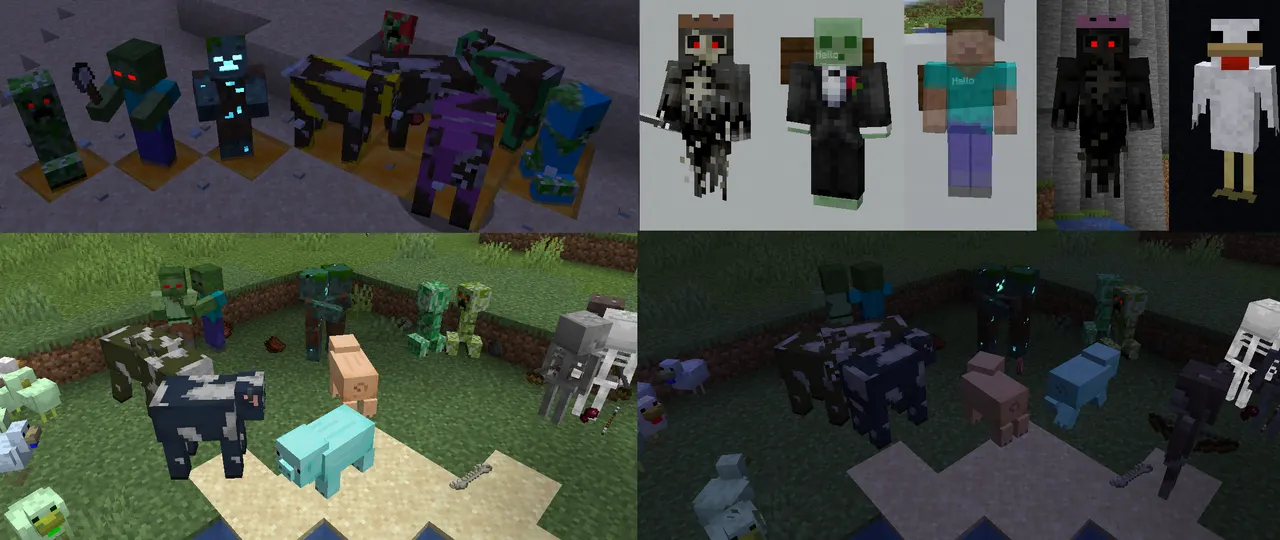
ETF is a Fabric/Forge mod that lets players apply custom textures to entities using OptiFine-compatible resource packs. It provides features like glowing textures, random skins, and blinking mobs without needing Optifine.
Players can tweak entity visuals with emissive effects, random texture swaps, and blinking animations. These changes are applied through resource packs, offering more control over mob appearances than vanilla.
Best for players who want to personalize their world's creatures or use advanced texture mods. It works well with modpacks that include OptiFine or other texture-enhancing mods.
ETF integrates smoothly with modpacks by supporting popular shaders like Iris and Sodium. It requires only the client side, making it easy to add without affecting server performance.

Features
- Supports OptiFine's random/custom entity texture format
- Adds emissive/glowing entity textures via resource packs
- Enables blinking animations for mobs with simple settings
- Includes player skin features like blinking and emissive textures
- Works with Entity Model Features (EMF) and Sodium
- Compatible with Iris shaders (support varies by shader)
- No dependencies required for basic functionality
Tips
- Use Mod Menu to tweak texture settings without editing files
- Test emissive textures with Sodium for better performance
- Set entity.getblockstate to VOID_AIR for default textures in GUIs
- Combine with OptiFine packs for maximum texture customization
How to install
- Install Fabric / Forge / NeoForge / Quilt for your Minecraft version (use the official installer).
- Download the file that matches your Minecraft version and Fabric / Forge / NeoForge / Quilt.
- Open the .minecraft folder and put the file into the "mods" folder (create it if missing).
- Launch Minecraft with the Fabric / Forge / NeoForge / Quilt profile.
FAQ
Does ETF work with OptiFine packs?
Yes, it supports OptiFine's random/custom entity texture format directly.
Are there any dependencies required?
No dependencies needed for core features to function.
Does ETF support shaders like Iris?
Partial support exists, but compatibility varies by shader version.

![[EMF] Entity Model Features](/media/27/icon.webp)